This year’s “AI browses for you” playbook splits into two camps: one camp builds new browsers and welds the agent into the shell; the other lets the agent remote-control a browser. I took a third path: no new browser, no remote control, just an employee jammed into the Chrome sidebar.
The result is called Edg Agent, an MV3 extension (WXT + React 19 + TypeScript). You give it tasks in plain language from the sidebar, “look up cascader in the Antd docs,” “fill out this form,” and it reads the page, clicks buttons, types text, scrolls, then hands back the result. Your tabs, your login state, your mouse focus all stay yours; it works alongside.
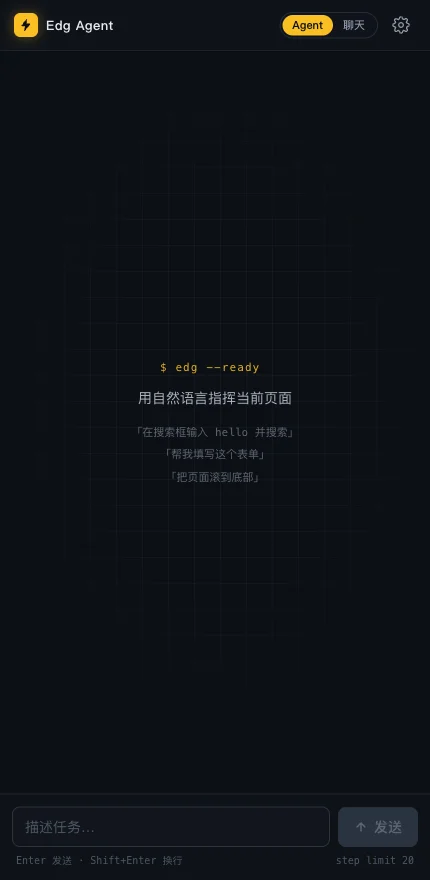
Every screenshot in this post is real: the extension ran for real, the LLM on the other end just happened to be a fake bird I wrote myself, the reason comes later.
Sign the contract before clocking in
First launch asks for LLM config: OpenAI, DeepSeek, or any OpenAI-compatible endpoint. The key only lives in chrome.storage.local, never leaves the machine.
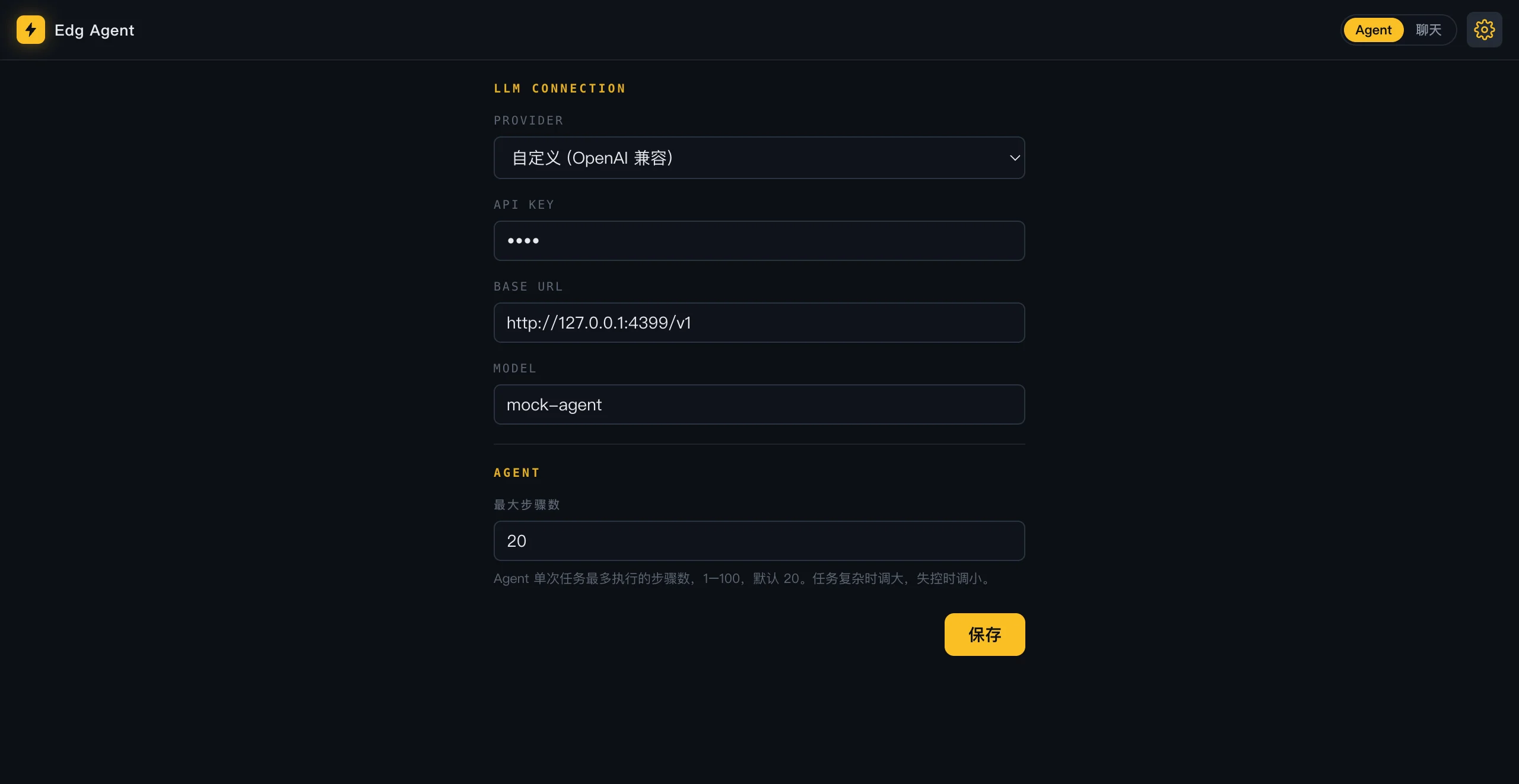
Look at the small text under the max-steps field: “crank it up for hard tasks, dial it back when it loses the plot.” The most honest settings copy I’ve ever written. In plain words: give it enough rope, but keep some on hand.
How it sees the page: snapshots, not screenshots
Text models can’t read pixels, so each step gets a text snapshot of the page first, only the interactable elements:
页面: 测试搜索站 (http://127.0.0.1:8932/search.html)
可交互元素:
[0] select options=[全部, 文章, 商品]
[1] input type=text placeholder="输入关键词"
[3] button "搜索"
Each turn the model is allowed to return a single JSON action, e.g. {"tool":"type","id":1,"text":"hello"}, then the loop runs again. The toolbox is small: click / type / select / scroll / navigate / new_tab / ask_user / read_page / done, plus two fallbacks: click_at (screenshot paired with normalized coordinates, for canvas-style pages with no DOM) and type_focused.
One action per turn, wait for the execution receipt before plotting the next move. Slow, sure, but every step is auditable, and when something goes wrong you can point at a specific step and say “this one was stupid.”
The system prompt is an employee handbook
By the time I’d finished drafting the LLM’s system prompt, the tone had slid, before I knew it, into the voice of a senior engineer who’s been babysitting interns too long. A few lines:
4. Apart from the JSON action, do not output any explanations, greetings, or surrounding text.
5. Any text after the JSON is silently discarded by the system. The user will never see it — including the body you thought you could "keep writing".
Rule 5 was forced on me by real behavior. The model loves tacking on a cheerful “Is there anything else I can help with?” after the JSON, polite and thorough, and that text goes straight to /dev/null. The handbook has to spell out the ugly truth.
Another rule, on deliverables:
The summary of `done` is the only final deliverable the user actually sees. If the task requires producing specific content
(test papers, summaries, lists, answers, etc.), you must write the complete result in full into summary.
You may not write only an intro like "I've prepared the following".
Without this rule, it really does deliver a cheerful “I’ve prepared the following” and clocks out.
On the call itself, temperature=0 pins action drift down, max_tokens=4096 leaves a reasoning model enough headroom for thinking plus JSON. If the format comes back broken, the retry bumps the budget to 8192 and the temperature to 0.2, the equivalent of letting it have one coffee and try again.
What a real run looks like
“Type hello in the search box, then click search.” Three steps:
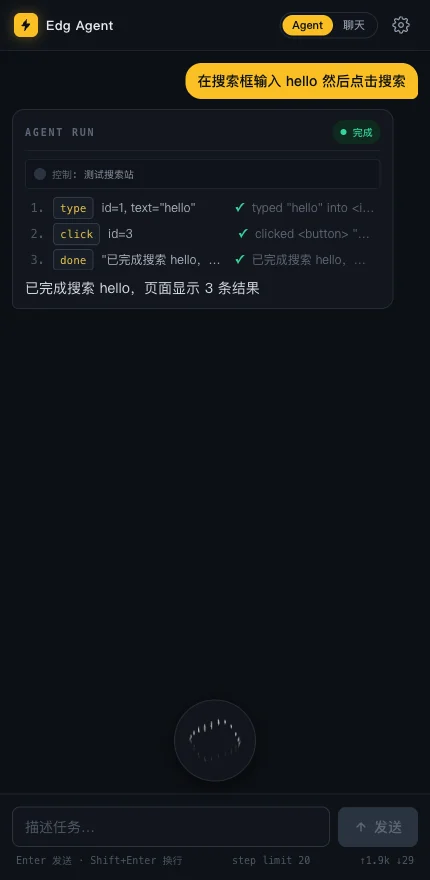
Each card lists the tool name, the parameters, and the execution receipt; the lower-right corner carries the running token bill: ↑1.9k ↓29. The page being operated on:

One detail at task close: the CDP session has to be detached with cdpDetach, otherwise a “Chrome is being debugged by…” bar pins itself to the top of the page, like an employee clocking out but forgetting to take off their badge.
When it wants to spend your money
You can’t have it click “Submit Order” just because it sees the button. High-risk actions are gated by a keyword regex:
const DANGEROUS_RE = /(submit|pay|purchase|buy|delete|remove|send|post|publish|order|支付|付款|购买|删除|移除|发送|发布|提交|下单)/i;
const DANGEROUS_URL_RE = /(checkout|payment|cart|pay)/i;
A hit pauses the task, pops up a confirmation card, and lays the action out as-is:
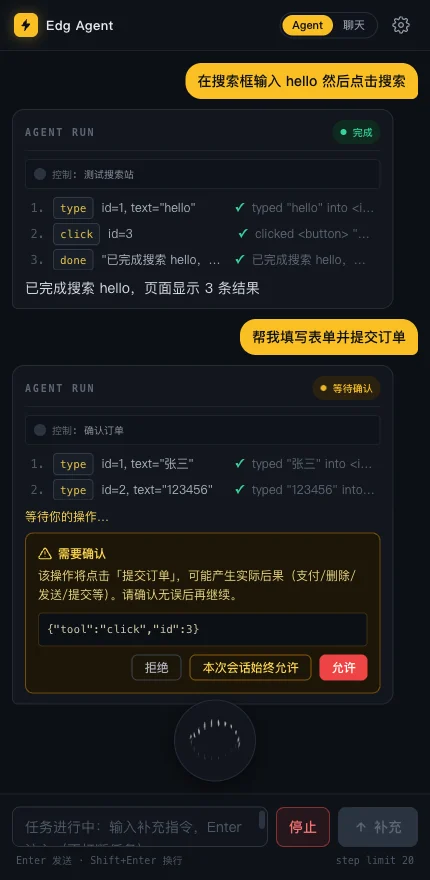
Three buttons: deny, allow, always allow for this session (in-memory, forgotten the moment the sidebar closes; never trust a persisted “I agree”). After I click deny:
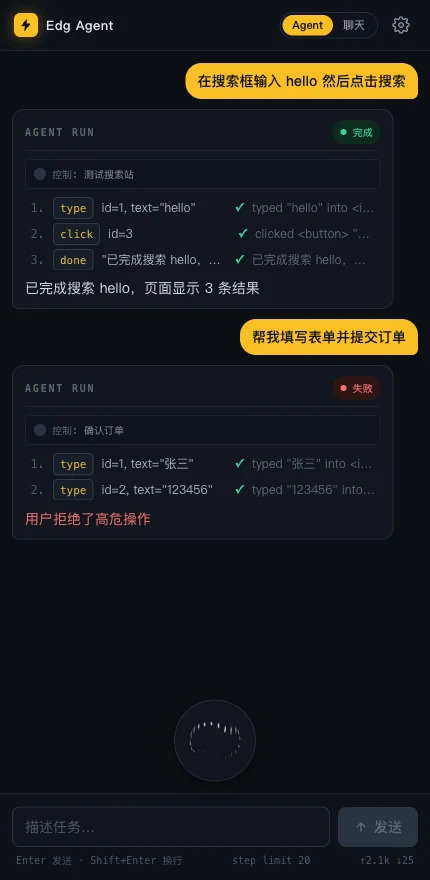
Notice the form is already filled in: “张三 / 123456.” The action got stopped at submit, the form is filled, the money never left. The work is half done, the decision is yours.
It asks back, and it goes quiet
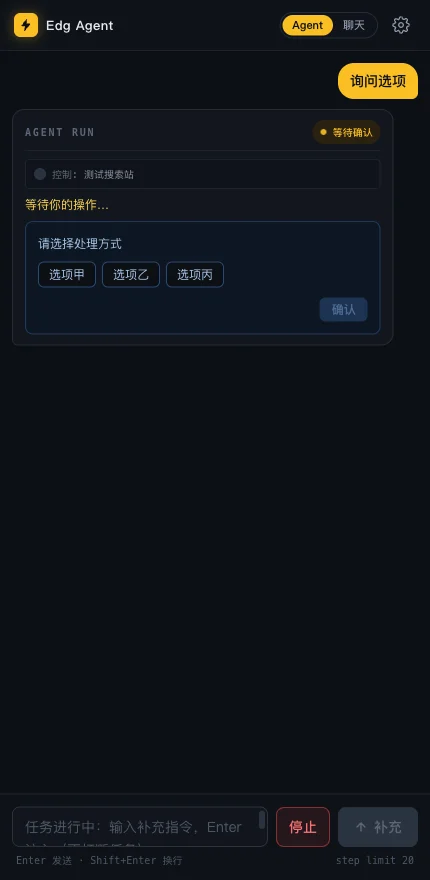
When there’s not enough information, it has ask_user, with 2 to 6 options rendered as buttons so you don’t have to type:
While it waits on the LLM, a 64px thinking orb floats at the bottom: a canvas + rAF dot animation styled after the “composing…” dot bands you see in input methods. If the system has “reduce motion” on, only a single static frame draws. Nobody gets forced to watch a loading spinner.
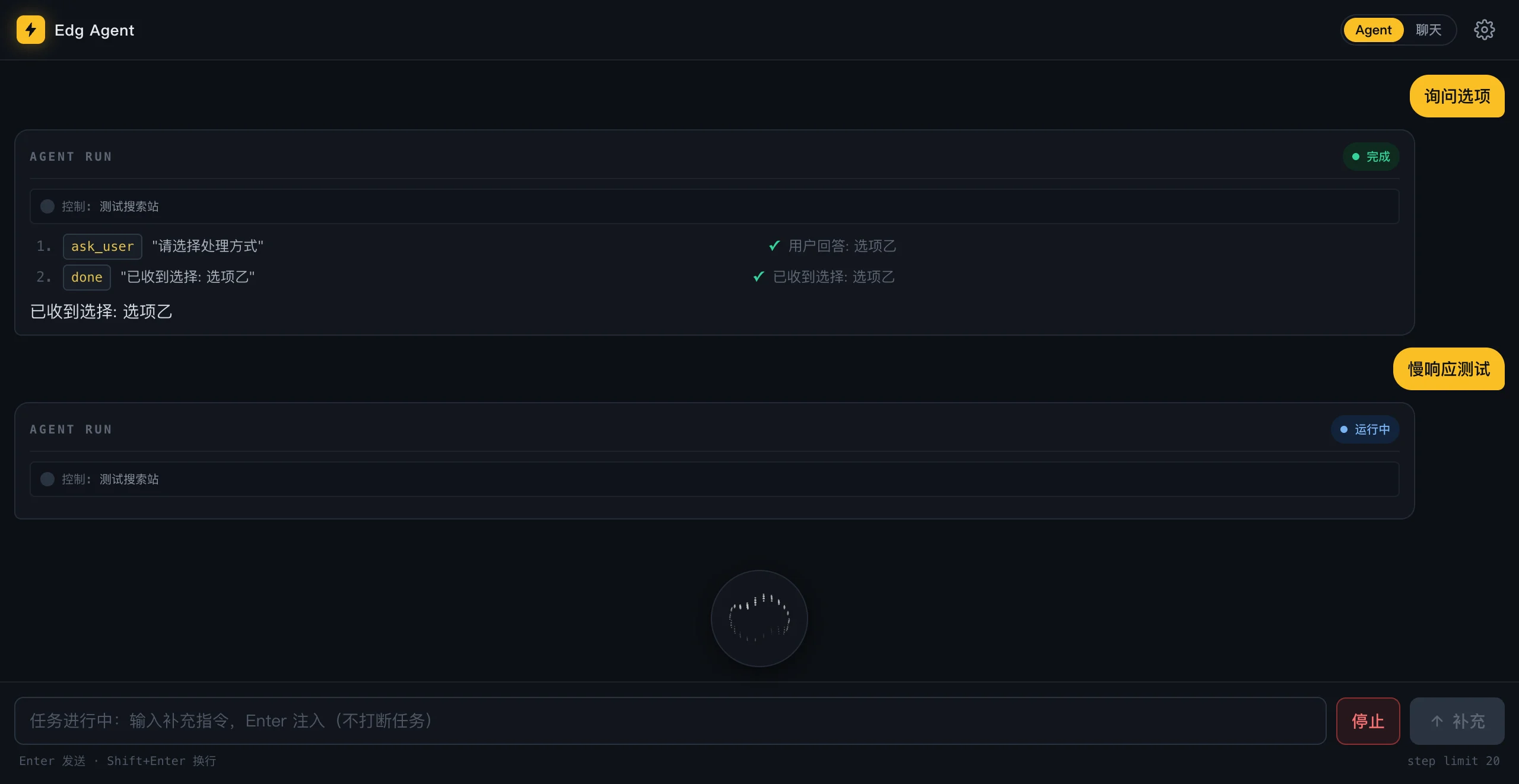
While the task is running you can still pipe in: the bottom input becomes “send follow-up instruction,” and the new instruction lands in the conversation as a user message without breaking the current step. The boss changes the spec mid-run, the employee keeps going.
Modern frontends’ first lesson for it
The “dropdown” in antd, element-plus, and friends isn’t a <select>. It’s an input plus a floating layer plus a pile of div[role=option]. Slamming the select tool at it gets you nothing but not a select element.
The handbook has a teaching recipe for this case: click the trigger first to open the floating layer, the next snapshot will show the role=option elements, then click the target option. The error message from a failed select also nudges the model down this road. Everyone doing browser automation hits this trap; the difference is that humans learn once and remember, the agent carries the handbook on it.
Testing an agent with a parrot
Real-LLM E2E has three problems: expensive, slow, flaky. Today’s passing case becomes tomorrow’s “model woke up on the wrong side of the bed” failure. So I wrote e2e/mock-llm.mjs: a zero-dependency deterministic fake LLM, a node:http server on 127.0.0.1:4399, a state machine in essence, it reads the snapshot text and replays scripted JSON actions.
It doesn’t understand words; a parrot learns to repeat, that’s enough. The snapshot message format is therefore frozen verbatim in the source, with a comment noting “the mock LLM relies on this to parse it”; whoever changes the format changes the parrot. The scripts cover search, high-risk confirm, canvas visual fallback, component-library dropdowns, long forms, and scrolling, plus two adversarial cases: one returns unclosed <think> garbage to test format tolerance, the other pastes a body containing } after the done JSON to test tail-trimming. It also ships a health endpoint. After finishing this post’s screenshot runs I hit it once and got, verbatim:
{"reqCount":27,"sawImage":false,"sawSteer":false,"sawHistory":false}27 gigs since it clocked in, and it never invoiced me once.
There’s another browser hurdle for running E2E. Chrome 137 removed --load-extension, so a stock Chrome can’t load an unpacked extension from automation. Only Chrome for Testing works, the crash-test dummy of browsers. There’s one honest gap: e2e/prepare-ext.mjs pre-injects host_permissions: ["<all_urls>"] into the manifest, so the runtime permission-prompt path is outside E2E coverage and has to be verified by hand. A test double takes the hits for you, but you have to own up to the hits it doesn’t take.
Three engineering details worth borrowing
History pruning. Each turn’s snapshot gets reinjected into the conversation, so the prompt volume grows as O(n²). The current approach keeps only the last 2 full snapshots; older ones are rewritten to placeholders, and the volume drops back to O(n). The model is told anyway to “always act on the latest snapshot, never reuse an old id by memory”; keeping the old snapshots around was a liability waiting to happen.
Truncation rescue. When the model writes a long deliverable into done.summary, max_tokens can lop it off mid-stream and the JSON never closes. salvageDoneSummary reverses the escapes on whatever summary content already made it out. The draft is yours even when the run dies halfway.
Input channel. Operations go through CDP first (Input.dispatchMouseEvent / insertText / mouseWheel), real events, passes most frontends’ real-user detection. When CDP isn’t available, fall back to DOM operations; the receipt for those carries a (dom) suffix, and the log instantly tells you which step was the second-best option.
Limits
It inherits your browser’s full login state, it can do everything you can, and that’s the convenience and the risk, which is why high-risk confirm and session-scoped “always allow” are shaped the way they are. Chrome family only for now; Firefox MV2 is parked on the roadmap. The fake bird can’t measure a real model’s performance, and the results on a real LLM depend on which real bird you plug in; reasoning-tier models at M3 grade have hit 53-second single-step latency, go make a cup of tea.
Source is at github.com/RokiRan/edg-agent. The license is still undecided (the README admits as much), so treat it as an in-house toy for now. If you’re thinking about hiring an employee in your browser, decide which buttons it’s not allowed to touch before you sign the contract.